

 Türkiye (Türkçe)
 Worldwide (English)






📢 Önemli Bilgilendirme
Değerli ziyaretçilerimiz, 09.01.2026 Tarihi itibari ile alan adı,hosting ve sunucu satışlarımız aktif olacaktır. Bizleri tercih ettiğiniz için teşekkür ederiz.
İncele
Thunderbird is an email client software. You can work with it in the following way.
1. Open Mozilla Thunderbird.
2. In the left panel, you can see a list of your email accounts. Double-click on Inbox or if it is hidden, click on your email. It will expand to show the inbox, the trash list, etc. 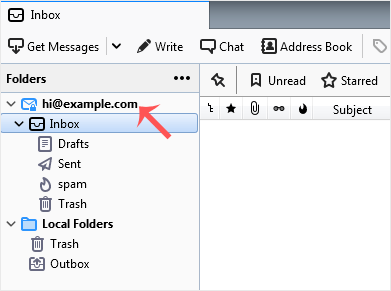
Another option is to right-click on the email address and choose "Get Messages".
Thunderbird also automatically checks email every 5 to 10 minutes. It also does that automatically whenever you open the program.
Bilgi bankasını detaylı olarak incelediniz, fakat ihtiyacınız olan bilgiyi bulamıyorsanız,
Bir Destek Talebi Oluşturun.